Your Korea eSIM mostly holds on the subway and gets patchier on the KTX and mountain trails
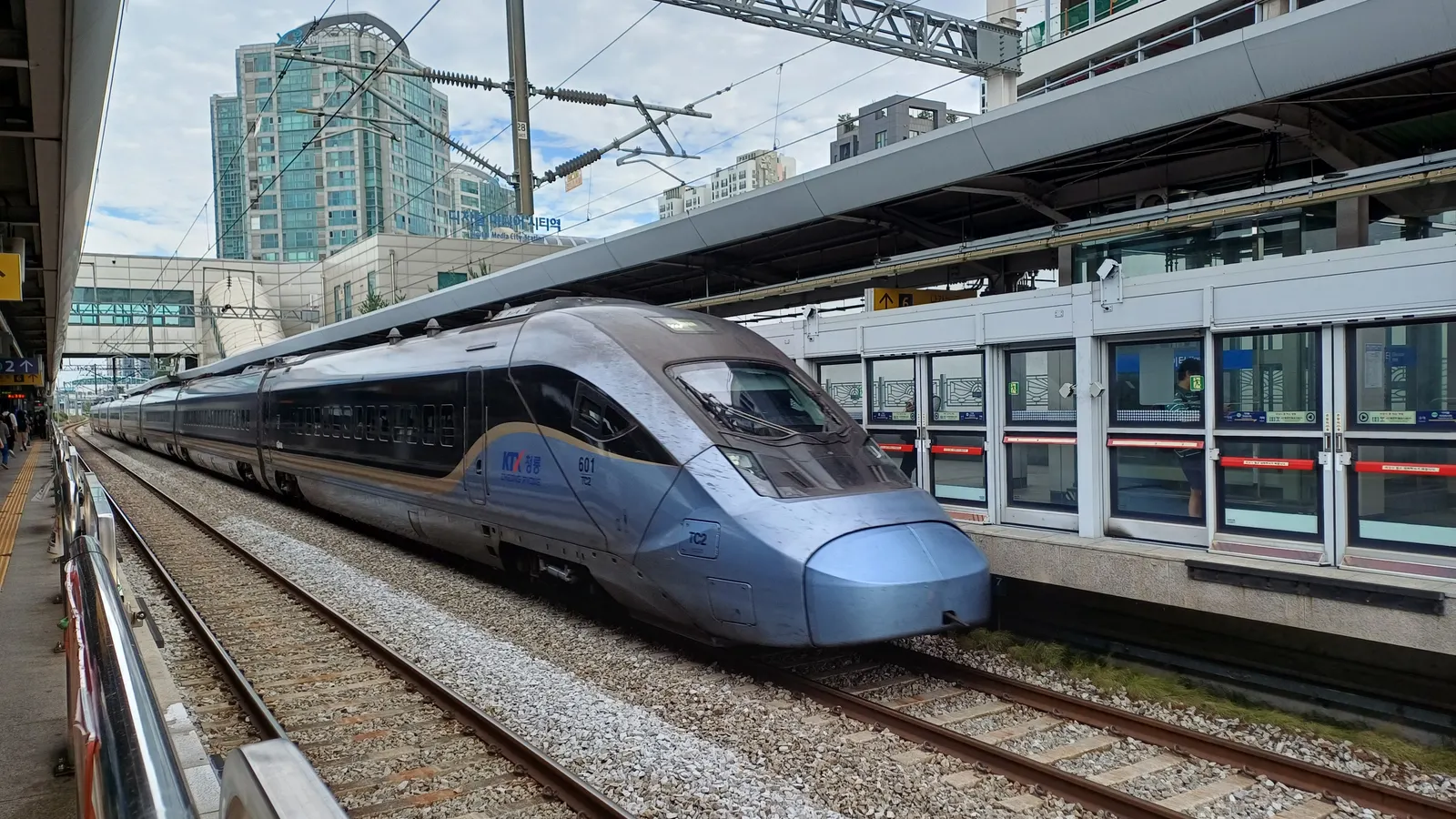
In Seoul and Busan, mobile data on the subway is usually about as dependable as it is on the street above. The KTX and SRT are where it gets patchy, and for national park trails and ferry crossings the official figures are too coarse to plan on a signal. That is the picture from Korea's official network quality evaluations, and it applies to a Kedanto Korea eSIM because it runs on two of the carriers those evaluations measure.
This post is based on the Ministry of Science and ICT's 2024 and 2025 communication service quality evaluations, a Korail press release, the Korea Tourism Organization's train page and the Korea National Park Service's safety page, all checked on 30 September 2026.
Which networks does a Kedanto Korea eSIM connect to?
SK Telecom and LG U+, on 5G. Kedanto's Korea page says its Korea eSIM, sold as 15 plans, connects to those two networks. The eSIM is data only, so it gives you no Korean phone number and cannot make calls; calls and texts to your usual number still arrive on the SIM you already have.
One detail from the government's report matters later in this post. In parts of rural Korea the three carriers split up the work of building 5G and then share each other's equipment. The Ministry of Science and ICT lists SK Telecom as the builder for areas such as Sejong, South Chungcheong and South Gyeongsang, KT for North Gyeongsang and Gangwon, and LG U+ for South and North Jeolla and parts of Jeju. The same kind of sharing is used along stretches of the high-speed railway. So being on SK Telecom or LG U+ does not always mean you are on SK Telecom's or LG U+'s own antennas.
Both carriers also publish coverage maps of their own networks. Where to find them, and why a colored map is not a promise, is covered in the Jeju post.
How well does data hold up on the Seoul and Busan subway?
Well, with a short list of weak stretches. The Ministry of Science and ICT and the National Information Society Agency (NIA) published their 2025 evaluation on 30 December 2025. Using a 100 Mbps standard for high-definition streaming, 5G on the subway met it 98.56% of the time, slightly better than outdoors in general (98.1%). The average 5G download speed measured on the subway was 928.67 Mbps.
The report also names the sections that fell short. It counts a section as below standard when 10% or more of its 5G measurements came in under 12 Mbps. Out of 600 places tested, 13 subway sections failed that test: 6 for SK Telecom, 6 for KT and 3 for LG U+, with some overlap. They include a string of sections on Line 1 in the Seoul area, Line 9 between Gubanpo and Dongjak, the Sinbundang Line between Gangnam and Sinnonhyeon, and Busan Line 2 between Hopo and Jeungsan.
For LTE the list is longer: 44 subway sections, among them several sections on Busan Line 1 between Beomnaegol and Dusil. "Below standard" here means slow often enough to be noticed, not a dead zone. In practice a map or a message may take a few seconds longer between two stations and catch up at the next one.
Is there Wi-Fi on the subway you can fall back on?
Do not plan on it. The same 2025 report measured subway Wi-Fi at an average of 67.0 Mbps. It explains that most lines feed that Wi-Fi over an LTE wireless link, and that lines using a 5G link instead, such as Seoul-area Lines 3 and 4 and Incheon Lines 1 and 2, reached around 150–200 Mbps. The report files subway Wi-Fi under commercial Wi-Fi, which it describes as available to the carrier's own subscribers. We could not confirm that a traveler's eSIM counts as a subscriber for that purpose, so on the subway your own data line is the one to rely on.
Where does data get patchy on the KTX and SRT?
On high-speed rail the 2025 evaluation met the 100 Mbps standard only 81.44% of the time, against 98.56% on the subway. The average 5G download speed on high-speed trains was 393.01 Mbps, the lowest of any place type measured. 19 KTX and SRT sections were below standard for 5G, mostly on the Gyeongbu and Honam lines.
The listed KTX sections include Gwangmyeong to Cheonan-Asan, Cheonan-Asan to Osong, Osong to Daejeon, Daejeon to Gimcheon-Gumi, Gimcheon-Gumi to Dongdaegu, Dongdaegu to Gyeongju, Gyeongju to Ulsan, Yangpyeong to Seowonju and Jeongeup to Jangseong. On the SRT they include Miryang to Jinyeong and Gongju to Iksan. Of the 19 sections flagged a year earlier, 14 had improved and 5 had not, including the run from Cheonan-Asan through Osong and Daejeon to Gimcheon-Gumi.
The ministry says the problem sits mainly in stretches where carriers share one network, which is why being on SK Telecom or LG U+ does not steer you around it. Its stated plan is to fix the key Gyeongbu and Honam sections by March 2026, all of the Gyeongbu and Honam lines by December 2026, and every high-speed line by December 2027. As of 30 September 2026 we had not found a published result showing whether the March 2026 step was met; the ministry says it re-checks flagged sections in the following year's evaluation.
The report does not break its results down by tunnel, so this post does not blame tunnels in particular. What it does show is that a KTX trip from Seoul toward Daejeon, Daegu or Busan passes through several sections where a slow or stalled connection is more likely than anywhere on the subway.
Can the KTX's free Wi-Fi fill the gaps?
Sometimes, but it rides on the same mobile networks. The Korea Tourism Organization's train page, last updated on 7 August 2026, says almost all KTX and SRT trains offer free Wi-Fi and that the connection may be unstable depending on circumstances.
Korail's own press release of 16 February 2022 explains how that Wi-Fi reaches the internet. Korail works with mobile carriers, has partnered with several since 2017 so that Wi-Fi keeps running if one carrier's service drops, and was adding a load-balancing system that gives passengers whichever of its duplicated carrier lines is faster. Because the train's Wi-Fi uses mobile lines to connect, we would not expect it to hold up in a section where mobile signal itself is weak. Treat it as a second route, not a separate network.
Things worth doing on the platform, before the train leaves:
- Open your ticket in the app you booked with and note your car and seat number. The Korea Tourism Organization lists the Korail website, the KORAIL+ app, NAVER and KakaoT among the ways to buy tickets.
- Screenshot the next leg: your transfer at the far end, the station exit, and the address of where you are going, written in Korean.
- Start any large download at the station, not somewhere between Osong and Daejeon.
What about intercity and express buses?
The government measures the expressways those buses use, and they did better than the railway. In the 2025 evaluation, expressways met the 100 Mbps 5G streaming standard 97.12% of the time, with an average 5G download of 585.42 Mbps. For LTE, measured against a 45 Mbps video-call standard, the expressway figure was 79%.
We did not find an official page setting out which intercity and express buses carry Wi-Fi, so this post does not count on it. On a long bus ride, plan as you would on the KTX: save the arrival terminal's name and your onward route before you board.
Can you get a signal on Bukhansan and other national park trails?
There is no official figure for any single trail, including Bukhansan. The closest thing is the 2024 evaluation, published on 30 December 2024. It tested 41 hard-to-cover places: 10 national park trails, 10 ferry routes, 20 islands and one coastal road. Those places were tested for LTE and 3G only, not 5G. On the trails, the average LTE download was 88.20 Mbps. An average like that tells you there was signal where the testers walked, not that every ridge and valley has it.
What the Korea National Park Service does publish is a way to say where you are when your phone can't. According to its safety page, multipurpose location signs stand about every 500 m along trails. Each shows a number that identifies your position, along with the phone number of the park office and the nearest 119 rescue team. The top of each sign carries a QR code with trail courses and nearby public transport, which of course needs data to open.
The Korea National Park Service manages 23 of Korea's 24 national parks, Bukhansan among them. Hallasan on Jeju is managed by Jeju Province and has its own booking and entry rules, set out in the Jeju post.
Before you start up a trail:
- Photograph the trail map at the trailhead and screenshot the route back to your bus or subway stop.
- Glance at the sign numbers as you pass them, so the last one is fresh in your mind if something goes wrong.
- Keep a line that can make calls. An emergency call to 119 needs voice service, such as your home SIM on roaming. A Kedanto eSIM carries data only.
Which map apps work in Korea, and what they can store in advance, is in the map apps post.
What should you expect on islands and ferry crossings?
Ferry routes had the lowest LTE speeds of the hard-to-cover places in the 2024 evaluation. The average LTE download was 67.77 Mbps on ferry routes and 92.72 Mbps on islands, compared with 130.12 Mbps on the coastal road. As on the trails, 5G was not part of that test. The 2025 evaluation put rural areas as a whole at 96.05% for the 100 Mbps 5G standard, against 99.08% in big cities.
For a day trip by boat, the useful things to have on your screen are the ones you would need without signal: your ferry ticket or booking number, the departure time of the last boat back, the terminal's name in Korean, and your accommodation's address. Weather can change ferry schedules, so check the day's sailings while you are still on a solid connection.
What did this post not manage to verify?
Several things a traveler would want to know have no official answer that we could find on 30 September 2026:
- Signal on any named trail, including Bukhansan and Hallasan.
- How much of the KTX slowdown happens in tunnels rather than open stretches.
- Whether the ministry's March 2026 step for the Gyeongbu and Honam lines was reached.
- Whether a traveler's eSIM can log in to the carriers' subway Wi-Fi.
- Which intercity and express buses have Wi-Fi.
We left each of these out rather than guess. If you find the answer on the ground, the checks above still hold: know your networks, save what you will need, and keep a line that can call.
What should be on your phone before a day with patchy signal?
A short list covers most of it: tickets opened and screenshotted, the return time for the last train, bus or boat, addresses in Korean, a photo of the trail map, and a charged battery. If signal comes back but pages still will not load, the settings to check are in when your Korea eSIM is on but the internet is not. If a long day of streaming on the train is what uses up your allowance, what happens when the data runs out explains how a daily plan and a total-data plan each behave. The plans themselves are on the Korea page.
On the morning of a KTX day to Busan, most of the work is done before the train moves. Before leaving Seoul Station you open your ticket, screenshot the route from Busan Station to your hotel and let the phone finish its downloads on the platform. Somewhere past Osong a page stalls, and nothing about your trip depends on it.
Sort your data out before you fly
You keep your SIM and add one data line. Your home number stays on your usual SIM; whether its calls and texts reach you abroad depends on your home carrier's roaming.
See eSIMs by countryRead next
- A travel eSIM for Korea won't go on your Apple Watch or Galaxy Watch
- When exactly is a Korean eSIM activated? Refunds end at installation, validity starts at activation
- Korea and Japan on one trip: why it takes two eSIMs, with prices for three itineraries
- What to use instead of Google Maps in Korea — map apps and data