Your first 30 minutes in Korea: a checklist from airplane mode to the airport railroad gates
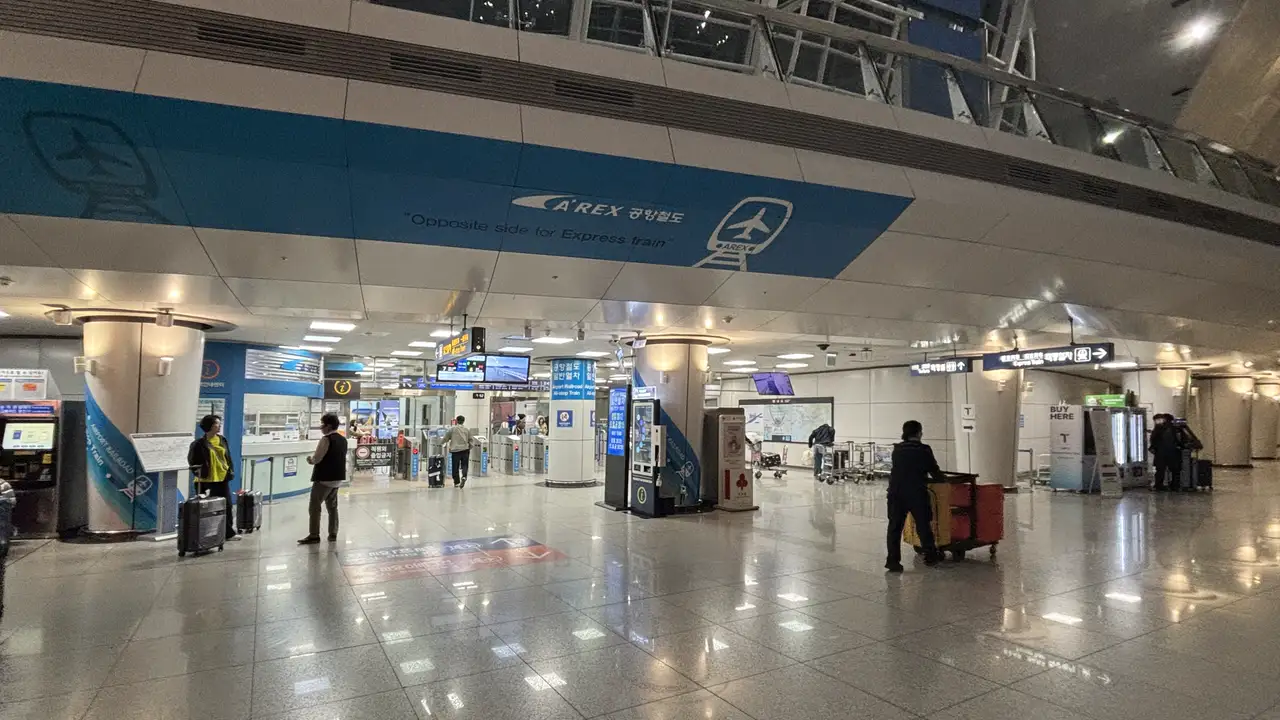
Between the moment your wheels touch the runway at Incheon and the moment you pass through the airport railroad gates, there are eight things only you can do. The first five happen inside your phone, so the order matters. The last three are about a transport card and a train, so the place matters. The short version: keep roaming off on your home line, turn on only the travel eSIM line and its roaming, buy a transport card on the first floor where you come out of arrivals, then go down to the Transportation Center on B1.
How long immigration and baggage take changes from day to day. Incheon International Airport tells travelers booking onward transport to allow 1–2 hours after landing for entry. The 30 minutes in this checklist are the tasks you finish yourself, separate from that waiting. Airport and transport details were checked against Incheon International Airport, Tmoney and AREX (Airport Railroad) official sources on 19 September 2026.
What do you do between landing and the train gates, and in what order?
- Check that data roaming is off on your home line — if you switched it off before leaving, this is just a glance.
- Turn off airplane mode — the walk from the plane to immigration is enough time.
- Turn on the travel eSIM line and turn on data roaming for that line
- Move your cellular data line to the travel eSIM
- Confirm you are connected — status bar, the status on your Kedanto order page, a route to where you are staying.
- Buy a transport card — at a 24-hour convenience store or bus ticket office once you are through customs.
- Top up the card — at airport railroad stations, top-ups are paid in Korean won cash.
- Find where you board — the airport railroad is on B1 of the Transportation Center at both terminals; bus tickets are sold on 1F at Terminal 1 and on B1 of the Transportation Center at Terminal 2.
Steps 1–5 are phone settings, so you can do them while you wait for your bags. If these screens are new to you, keep where the install screens differ on iPhone and Galaxy open alongside to match the menu names. If the eSIM is not installed yet, that guide comes before this checklist.
What should you check before turning off airplane mode?
Whether data roaming is off on your home line. When airplane mode goes off, your phone starts looking for a Korean network on every line that is switched on. If your data line is still your home line and roaming is on for it, the data used in the few minutes before you switch lines can be billed as roaming by your home carrier.
Apple describes data roaming as what lets you reach the internet over cellular "in regions that are not covered by your carrier's network," and notes that only some carriers include international roaming on select plans without additional fees. The same page shows where to turn it off. Kedanto's setup guide says the same thing from the other side: after you land, turn roaming on for the travel line and leave it off on your home line.
- iPhone: Settings → Cellular → your home number → Cellular Data Options → turn Data Roaming off
- Galaxy: the Data roaming switch is under Settings → Connections → Mobile networks
The most reliable moment to do this is before you leave home. If you didn't, make it the very first thing you look at once airplane mode is off.
Where do you turn on the travel eSIM line, and which line gets roaming?
Data roaming goes on for the travel eSIM line only. Kedanto's order page explains that the eSIM activates when you turn on data roaming for it in Korea, and that the validity period starts from that moment. The troubleshooting list in Kedanto's guide also puts "is roaming on for the travel line" near the top when the internet doesn't work.
- iPhone: Settings → Cellular, tap the travel line, and if it's off, turn on "Turn On this Line." On the same screen, open Cellular Data Options and turn on Data Roaming.
- Galaxy: Settings → Connections → SIM manager, switch the travel eSIM on. Then Settings → Connections → Mobile networks, and turn on Data roaming for the travel eSIM.
On iOS 26 and later, you may see a "Turn On Travel eSIM" notification when you arrive. According to Apple's guide on using eSIM while traveling (published 17 September 2026), tapping it lets you choose Travel eSIM Only or Travel eSIM and Current eSIM. If you keep both lines on, the travel eSIM carries your data and your primary line keeps working, but Apple notes you might still incur roaming fees from your home eSIM. That is exactly why step 1 is there. You are then asked to turn on Low Data Mode or choose Not Now, and the travel eSIM activates.
Why do you have to pick the data line separately?
Because a phone uses cellular data on only one line at a time. Apple's Dual SIM guide puts it plainly: "One number at a time can use cellular data." Even with the travel line on and its roaming on, if the data line is still your home line, your internet traffic keeps trying to go out through your home line.
- iPhone: Settings → Cellular → Cellular Data → the travel line
- Galaxy: Settings → Connections → SIM manager → Mobile data → the travel eSIM
Only the data line moves. Your home line stays on, and whether calls and texts to your home number reach you in Korea, and at what cost, depends on your home carrier. The Kedanto Korea eSIM is data-only, so it does not give you a Korean phone number.
How do you know you're actually connected?
Check these three things in order, with airport Wi-Fi disconnected. If Wi-Fi is connected, pages open even when mobile data isn't working, and you can't tell which one you're on.
- The status bar — look for signal bars and a network indicator such as 5G or LTE. The Kedanto Korea eSIM connects to SK Telecom and LG U+ 5G networks.
- Your Kedanto order page — open it from the link in your eSIM email, or from your orders if you signed in. In the "Data left" box, the status should change from "Installed · not activated" to "In use." The page notes that usage can lag a few minutes behind the network, so if nothing changes right away, wait a moment and tap Refresh.
- A route to where you're staying — put the address into your map app and bring up the route once. Which station you get off at, and where you change, is what decides your train in step 8.
If any of the three looks wrong, go through when your Korean eSIM is on but the internet isn't, which covers each phone in turn. If the travel eSIM isn't in your line list at all, the problem is at the installation stage.
Where at the airport do you buy a transport card?
At a convenience store or bus ticket office on the arrivals side, once you are through customs. Tmoney's official page for international visitors lists the TMONEY TRAVEL CARD at 4,000 won and names convenience stores and the bus ticket offices at Incheon Airport as where it's sold. It says the card works on buses, the subway, taxis, airport buses and express buses. The same page says the KOREA TOUR CARD, which still appears in older travel guides, has been discontinued. The 4,000 won is listed as the price of the card, so plan on adding your fares separately as a top-up.
These are the 24-hour convenience stores and bus ticket points on the arrivals side, as listed in Incheon International Airport's official facility guide (checked 19 September 2026):
| Terminal | 24-hour convenience stores near arrivals and the Transportation Center | Where to buy bus tickets |
|---|---|---|
| Terminal 1 | CU — 1F public area near Exit 2, arrivals gate B, arrivals gate E and Exit 13 | Bus ticket offices inside and outside the terminal on 1F |
| Terminal 2 | CU — 1F public area (center) and Transportation Center B1 (center) | Bus terminal on Transportation Center B1 |
The official guide doesn't list card stock by store. If one store has run out, try the next convenience store or a bus ticket office.
How do you top up the card?
If you top up at an airport railroad station, pay in Korean won cash. AREX's passenger terms (revised December 2025, in force from 5 January 2026) say that when you load a prepaid transport card you pay first in cash, or with a cashier's check of up to 100,000 won. The same clause accepts credit cards only for single-journey transport cards and AREX-only tickets.
We could not confirm from an official source which payment methods convenience store counters accept for top-ups. Carrying a little Korean won cash to the first-floor store is the safe way to do it. If all you have is a foreign card, the single-journey ticket below is your next option.
How do you ride the airport railroad without a transport card?
Buy a single-journey transport card from a machine at the station. AREX's terms say that passengers without a transport card can buy a single-journey card from the station's ticket machines. It costs the transport-card fare plus 100 won (not for children or concession fares), plus a 500 won deposit. You get the deposit back by returning the card at the station where you get off. Single-journey cards can be bought with a credit card, which makes them the way into the city when you have no cash yet.
Incheon Airport's official guide places the airport railroad ticket machines on B1 at both terminals. A single-journey card is used once and handed back, so the card you'll use for the rest of your trip is something you pick up later at a convenience store in the city.
Where do the airport railroad and the buses leave from, and how are the trains different?
The airport railroad leaves from B1 of the Transportation Center at both terminals. Bus tickets are sold at the ticket offices on 1F in Terminal 1, and at the bus terminal on Transportation Center B1 in Terminal 2 (Incheon Airport official guide).
Two kinds of train run on the airport railroad. Based on AREX's terms:
| All-stop train | Express train | |
|---|---|---|
| Stops | Every station | Only Seoul Station, Incheon Airport Terminal 1 and Terminal 2 |
| Seats | Not assigned | Assigned |
| How you ride | Transport card or single-journey card | Express train ticket (sold at the customer center, ticket machines, the website and the app) |
By Incheon Airport's official route guide, the all-stop train takes 66 minutes from Incheon Airport Terminal 2 station to Seoul Station, and Terminal 1 station sits 6 minutes along the line toward Seoul. Times listed from Terminal 2 station on the same page are 44 minutes to Gimpo Airport, 54 minutes to Digital Media City and 58 minutes to Hongik University. The express train doesn't stop at any of these, so if the route you pulled up in step 5 has you changing at one of them rather than at Seoul Station, the all-stop train is the one you want.
What do you check one last time at the gates?
Down on B1, standing in front of the fare gates, the checklist is done if you have three things in hand: a phone whose status bar shows the travel line's signal, a topped-up transport card (or a single-journey card bought with your credit card), and the name of the station where you change, taken from the route on your map. With those three, there is nothing left to do on the train but look out the window. How much data you'll use while you're in Korea is covered in daily 1GB or 5GB total, and what happens if your data runs out mid-trip is in when your Korean eSIM data runs out.
Sort your data out before you fly
You keep your SIM and add one data line. Your home number stays on your usual SIM; whether its calls and texts reach you abroad depends on your home carrier's roaming.
See eSIMs by country