Which Korean ATMs give cash on a card from home and who charges for it?
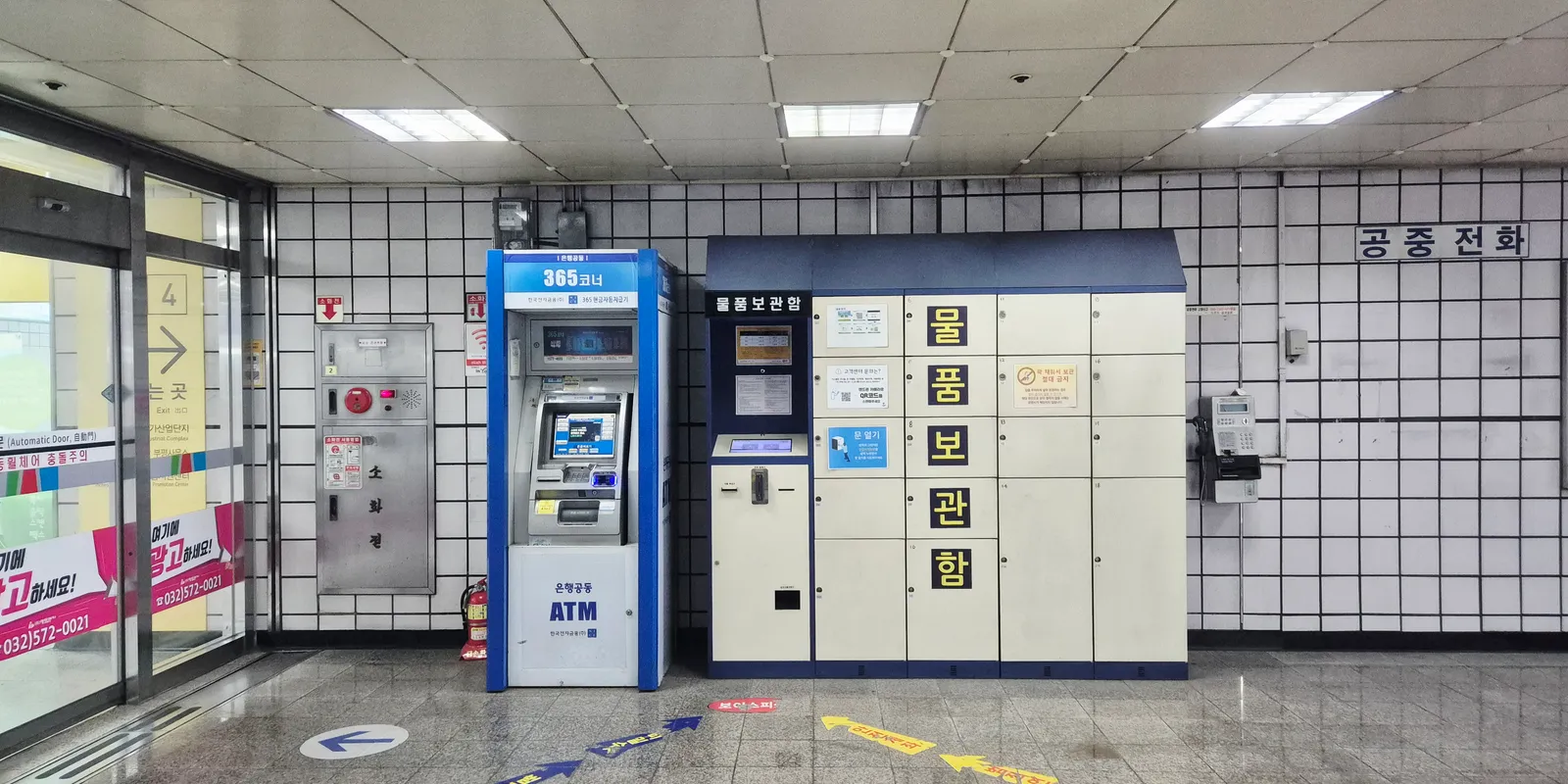
A card from home comes out of a Korean ATM with cash when the machine is marked Global ATM or carries your card network's logo; a plain bank machine with neither may simply hand the card back. The cash machines inside CU, emart24 and 7-Eleven belong to an operator whose foreign-card service covers Visa, Mastercard and UnionPay, and they run around the clock. What a withdrawal costs has two layers, your own bank's charge and a service fee that some Korean machines add, and how much comes out per transaction is set by the machine, not by a national rule. What follows was checked on 3 November 2026 against JCB's overseas ATM guide (dated 30 October 2026), UnionPay International, the ATM operator NICE Infra, the customer pages of KB Kookmin, Woori and Hana, Incheon Airport's facility list, the Korea Tourism Organization and Visa.
Which Korean ATMs take a card issued abroad?
Machines labelled Global ATM, and any machine showing the logo that is on your card. JCB's guide to ATMs abroad, dated 30 October 2026, tells its cardholders to use machines marked Global ATM in Korea. Its list of Korean partners names KB Kookmin, Shinhan, Woori, Hana, NH, IBK, Standard Chartered, BC Card, the regional banks BNK Busan, BNK Kyongnam, DGB Daegu, Kwangju and Jeju, and Hyosung TNS, an ATM maker rather than a bank. Hana Bank's own FAQ calls these machines its Global ATMs. UnionPay International's Korea guide puts the rule the other way round: any ATM with the UnionPay logo accepts a UnionPay card for withdrawals.
Convenience stores are the easiest place to find one. NICE Infra, the operator of the blue 365 Corner machines (until 2025 the company was called Korea Electronic Financial, the name still printed on the machine in this article's cover photo, taken inside Galsan Station on the Incheon subway), lists CU, emart24 and 7-Eleven among the stores that house its ATMs, along with supermarkets, highway rest areas, bus terminals, KTX and national rail stations, Seoul subway Line 9 and the Incheon subway. It puts about 10,000 of its machines inside convenience stores and says they run 24 hours a day, 365 days a year. For foreign cards, NICE describes a cash service for Visa, Mastercard and UnionPay cardholders.
Which logos should be on your card?
Visa or Plus, Mastercard, Maestro or Cirrus, JCB, and UnionPay. Hana Bank's FAQ lists exactly those logos as the foreign cards that can check a balance at its Global ATMs, with cards from the Philippines and Malaysia excluded from that service. NICE names Visa, Mastercard and UnionPay. JCB covers its own cards through its 14 Korean partners, from KB Kookmin to Hyosung TNS.
Whether the card is credit or debit changes what the transaction is. On a credit card the withdrawal is a cash advance: JCB's Korea page describes it as drawing local currency on the card and repaying it later with a fee on top of the converted amount, so it is a cash advance with the issuer's fee on top; when interest starts is in your own card's terms, not on JCB's page. On a debit card the money leaves your account. UnionPay's guide suggests carrying a UnionPay debit card for cash abroad because its fees are usually lower than a credit card's, and reminds cardholders to switch on overseas transactions with their bank before leaving, since some accounts have them turned off.
One small thing stops some people at the keypad. JCB's ATM instructions say that in Korea some machines show a six-digit PIN field: type your four digits and press ENTER, and the screen moves on.
Who takes a cut of a withdrawal, your bank or the Korean machine?
Two parties can charge you: your card issuer, and the Korean machine. KB Kookmin's and Hana's ATM fee pages, read on 3 November 2026, list only charges for Korean cards; neither publishes a fee table for cards issued abroad. UnionPay International's guide gives the clearest description of the Korean side: UnionPay itself charges nothing for a withdrawal in Korea, but "some ATMs charge a withdrawal service fee, which is collected by the local Korean bank and has nothing to do with UnionPay or the issuing bank". JCB says its overseas cash advances carry a fee plus the conversion rate, and that the fee differs by card brand.
So the figure to find is on the confirmation screen, before you press yes. Read it, keep the receipt, and compare both with the line on your statement: the difference between the receipt and the statement is what your own bank added.
Won or your home currency: which should you choose on the screen?
Choose won. Some machines offer to convert the withdrawal into your home currency on the spot, a service the card networks call dynamic currency conversion. Visa's rules require an ATM offering it to show the amount in both currencies, the exchange rate used and any markup, and to leave the choice to you: a machine "must not choose on your behalf", and declining "will not impact your ability to make purchases or withdraw cash internationally". If those details are missing, or the screen pushes you toward one currency, Visa's advice is to decline the conversion and report it to your card issuer.
Taking won means your own bank converts at its rate and adds its own fee. Taking your home currency means the Korean operator converts at the rate and markup shown on that screen, and your bank may still add a foreign-transaction fee on top.
How much can you take out at once?
As much as the machine allows per transaction, within your own bank's daily limit. There is no published national ceiling for foreign cards. UnionPay's guide says some ATMs set a per-transaction cap and that you can withdraw in several transactions as long as the total stays within your card's limit; JCB says the amount per operation varies by machine. For comparison, the banks' own cards are capped at 1,000,000 won per withdrawal on KB Kookmin's and Woori's ATMs, with some Woori machines set at 600,000 or 700,000 won.
Several small withdrawals cost more than one large one when either side charges per transaction, which is why it is worth asking your bank for its per-withdrawal fee before you fly.
Can you switch the screen to English?
Yes on the bank machines, and KB Kookmin's also offer Japanese and Chinese; English is still the safe choice. KB Kookmin's ATM remittance guide shows the machine's first screen as "Select ENGLISH / 日本 / 中國語", so the language menu there has three entries. JCB tells its Japanese cardholders using NH Bank's ATMs to pick English rather than Japanese on the language screen, which tells you the network itself trusts the English menu more. Neither UnionPay nor NICE says anything about screen languages, and not every machine will have the other two, so count on English and have the amount in won ready as a number.
Where are the ATMs at Incheon Airport, and which run all night?
On the 3rd-floor departure level and the 1st-floor arrival level of both terminals, and never past immigration. Incheon Airport's FAQ says 24-hour ATMs are spread through the passenger terminal, and that under Korea's Foreign Exchange Transactions Act no ATM is installed in the duty-free area after immigration. A second FAQ adds that once you have passed security you cannot come back to the public area to withdraw cash. The facility list for each terminal, read on 3 November 2026, gives these locations:
- Terminal 1, 24 hours: NICE machines on 3F near check-in counters C, E, J and L, on 1F near exits 4, 6, 9 and 11, and on B1 beside the ticket machines for the all-stop train; Woori Bank's ATM on 3F near check-in counter H, which also includes a foreign-currency machine.
- Terminal 1, 06:00 to 22:00: KB Kookmin's ATMs on 3F near counters F and M and on 1F near exit 9; Woori's on 3F near counter C and exit 4 and on 1F near exits 6 and 11; Hana's on 3F near counters B and L and exit 11 and on 1F near exit 4.
- Terminal 2, 24 hours: NICE machines on 3F between counters C and D and between J and K, and on 1F near exits 3 and 7; Woori Bank's ATM on B1, east side of the public area.
- Terminal 2, 06:00 to 22:00: KB Kookmin's ATMs on 3F near exit 4, near counter L, between counters J and K and between C and D; Woori's on 3F near counters J and K and near exit 9, and on 1F near exit 7; Hana's on 3F near counter L and on 1F near exits 4 and 10.
For arrivals, the short version is: Terminal 1, 1F, exits 4, 6, 9 or 11; Terminal 2, 1F, exits 3 or 7. All of those are NICE machines and all are listed as 24-hour.
Should you exchange cash or withdraw from an ATM?
Exchange when you are carrying foreign notes anyway; withdraw when you are not. An exchange counter needs cash you brought from home and gives you the counter's posted rate. Incheon Airport lists 24-hour counters in both terminals: in Terminal 1, KB Kookmin near arrival hall B on 1F and near check-in counter F on 3F, and Woori near exits 6 and 11 on 1F and near departure hall 4 on 3F; in Terminal 2, Woori near exit 7 on 1F and KB Kookmin near exit 4 on 3F. The Korea Tourism Organization's airport-exchange page, last updated on 11 September 2026, gives the standard exchange-counter hours as 06:00 to 22:00 with some counters open 24 hours, and the airport bank branches as 09:00 to 16:00 on weekdays only.
An ATM needs nothing but the card, and the convenience-store machines take it around the clock, at the price of the two fee layers. For the T-money card and the first day's meals, a single modest withdrawal at an arrival-hall machine covers it; the transport card itself is sold and topped up for cash at convenience stores, and which station machines take an overseas card is set out in T-money or the Climate Card.
Do Korean ATMs work at night?
Convenience-store machines do; bank machines depend on where they stand. NICE's machines are advertised as 24 hours, 365 days. KB Kookmin's ATM guide draws the line for bank machines: the ones inside a branch lobby work during banking hours, 09:00 to 16:00, while its 365 Corner booths are open every day of the year with hours set corner by corner, and its late-night corners pause twice a night for maintenance, from 00:00 to 00:03 and from 05:00 to 05:10. Woori Bank's ATM page describes its machines as available 24 hours, 365 days, with the hours of each 365 Corner published separately. At the airport, the bank-branded ATMs close at 22:00 except Woori's two 24-hour machines, so after that the NICE machines are the ones left.
What do you do if the machine keeps your card?
Call the number printed on the machine, then your own bank. For a NICE machine, the operator's FAQ says to call 1577-4655 for a card or passbook caught in the machine and it will send someone out. For bank machines, KB Kookmin and Woori list their foreign-language lines for weekdays 09:00 to 18:00; Hana publishes no hours for its English helpdesk:
- KB Kookmin: Global Customer Center 1599-4477 in English, Chinese, Japanese, Vietnamese, Russian and Cambodian; from abroad +82-2-6300-9999.
- Woori: 1599-2288 for foreign customers, in English, Chinese, Japanese, Vietnamese, Thai and several other languages; from abroad +82-2-2006-5000, and loss reports are taken by phone 24 hours.
- Hana: English helpdesk 1599-6111, main line 1599-1111; from abroad +82-42-520-2500.
If you need an interpreter rather than a bank, the Korea Travel Hotline +82-2-1330 answers in Korean, English, Japanese and Chinese 24 hours a day, and in Russian, Vietnamese, Thai and Malay or Indonesian from 08:00 to 19:00. The bank lines are voice calls, which a data-only eSIM cannot place, so they go over your home SIM on roaming or over the store's phone if the staff are willing. The 1330 helpline is the exception: the Korea Tourism Organization's page also offers a web chat (1330 Messenger), chat through KakaoTalk, LINE, WhatsApp and Facebook, and an online voice call, all of which work over data. Calling 112 or 119 on a data-only eSIM explains what a data line can and cannot do with a phone number. Whatever happens on the Korean side, tell your issuer to block the card.
What is your phone doing while you look for a cash machine?
Finding the right machine, and seeing what you were charged. The nearest convenience store with a NICE machine, or the nearest bank booth still open at 23:00, is a map search, and the exchange rate your bank applied appears in its app minutes after the cash does. Kedanto's Korea eSIM carries the map search and the banking app on SK Telecom's and LG U+'s networks, and that is all it carries: there is no Korean number on it, so a withdrawal alert your bank sends by SMS can only reach the SIM from home, and only while that SIM is allowed to roam; keeping your home number for verification texts covers the settings.
The slip a 365 Corner machine prints has two numbers worth keeping: the won that came out and the service fee the machine added. Set it next to the line in your banking app the next morning, and the gap between them is your own bank's share. After 16:00 a bank lobby machine has closed and a 365 Corner keeps the hours on its sign, so the machine to look for late at night is the one inside the nearest CU, emart24 or 7-Eleven, the chains NICE lists for its 24-hour machines, and the currency to press is won.
Sort your data out before you fly
You keep your SIM and add one data line. Your home number stays on your usual SIM; whether its calls and texts reach you abroad depends on your home carrier's roaming.
See eSIMs by countryRead next
- 20 October at Seoraksan, 4 November at Naejangsan: Korea's 2026 autumn foliage forecast and getting there from Seoul
- The loud alert that just went off on your phone in Korea came from the nearest mast, and its one English word names the hazard
- 5G on a Korea eSIM is a bonus you don't need to chase
- How to stop your home carrier charging you roaming while you use a Korea eSIM