Seoul's free Wi-Fi covers markets, parks and buses, not the walk between them
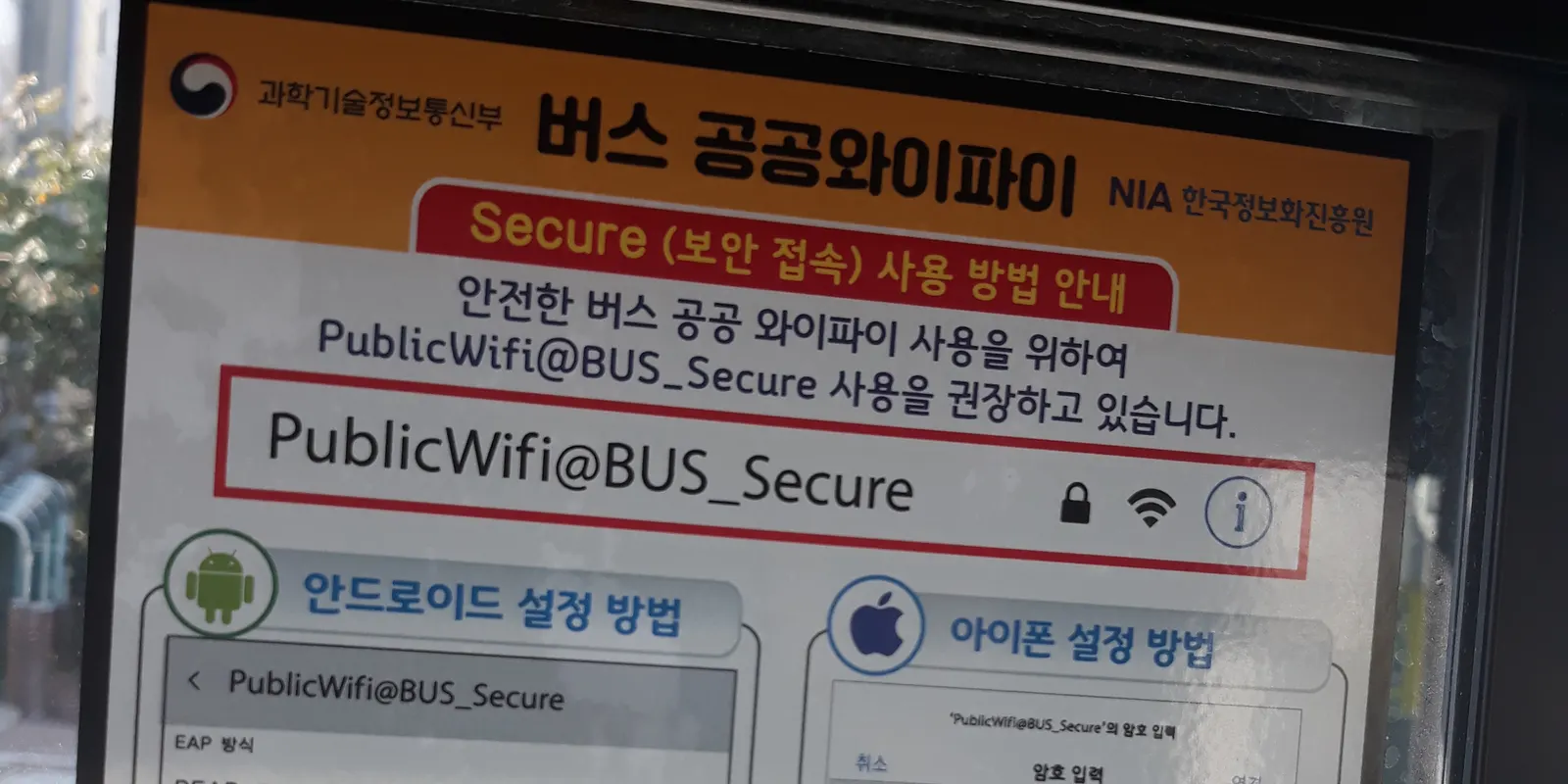
Seoul's free public Wi-Fi is good enough while you are standing in a market, a park, a tourist site or on a city bus. It is not enough for the parts of the day in between: walking from one place to the next with a map open, riding the subway, or sitting in a taxi. The city lists where its Wi-Fi is installed, and the gaps follow directly from that list. This post is based on the Seoul Metropolitan Government's public Wi-Fi page (last updated 12 March 2026), its open-data list of Wi-Fi locations, and the Ministry of Science and ICT's 2025 network quality evaluation, all checked on 10 October 2026.
Where does Seoul's free public Wi-Fi reach?
The city names main streets, traditional markets, parks and riversides, bus stops, tourist attractions, cultural facilities, welfare facilities, and city and village buses. That is the full list on the Seoul Metropolitan Government's public Wi-Fi page, last updated on 12 March 2026. The city's open-data list of public Wi-Fi locations had 26,286 entries when it was refreshed on 10 October 2026, and a single building can appear more than once in it.
A 2023 English news release from the city gives a sense of where the density is. It says 4,500 hotspots went up in Itaewon and along Cheonggyecheon Stream in the first half of 2022, more than 3,000 more in Hangang Park and Seoul Grand Park later that year, and 490 of those across 11 of the busiest Hangang Park areas, such as Yeouido and Ttukseom.
To see the spots before you go, the city's Smart Seoul Map (map.seoul.go.kr) has a "Seoul Public Wi-Fi" layer, split into indoor and outdoor locations, with the map interface available in English, Japanese and Chinese.
How do you connect to SEOUL_Secure?
Pick SEOUL_Secure in your Wi-Fi list and enter "seoul" as both the ID and the password. The city says that after you connect once this way, your phone joins automatically wherever its public Wi-Fi is installed. A second network, SEOUL_Secure_(3), uses the newer WPA3-Enterprise standard and takes the same login. If an Android phone asks for more settings, the Ministry of Science and ICT's bus Wi-Fi notice in the cover photo, taken in 2019, shows PEAP as the EAP method and the CA certificate left unvalidated.
The open network, SEOUL, needs no password but works differently. The city says you tap a connect button on the page that opens, and that you have to do it manually every time. For a visitor that difference decides whether Wi-Fi is usable on the move: SEOUL_Secure rejoins on its own as you reach the next hotspot, while SEOUL waits for a tap with your phone in your pocket.
Is the Wi-Fi fast when you have it?
Yes. In the 2025 communication service quality evaluation published on 30 December 2025, the Ministry of Science and ICT and the National Information Society Agency measured public Wi-Fi at an average download speed of 400.48 Mbps. That is far more than maps, messaging or video need. The same report found that 41 of the 1,269 Wi-Fi spots it checked, places shown as having Wi-Fi on carriers' coverage maps, could not be used on site, for reasons such as equipment faults. So the speed is there; what you cannot count on is coverage at the exact spot where you stop.
Why does the map stop working when you walk between places?
Because the Wi-Fi comes from fixed access points at the places on the city's list, and the stretch between two of them has none. The list names main streets, not every street, and nothing in it covers a residential side street or the last few hundred meters to a guesthouse. While you walk, the phone drops one hotspot and only reconnects when it reaches the next.
There is a second gap inside the network itself. Before 2021, Seoul had about 50 different public Wi-Fi network names, and the city's January 2021 notice said people had to reconnect every time they moved from one provider's hotspot to another's. That notice moved the city's own hotspots to SEOUL and SEOUL_Secure and said some hotspots opened by the Ministry of Science and ICT and by carriers would follow in stages. The city's 2023 release lists "SEOUL/Public Wifi Free" and "SEOUL_Secure/Public WiFi Secure" as the network names, so you can still meet a hotspot your phone does not join on its own.
Map apps need live data for routes, bus arrival times and walking directions, and our guide to Korean map apps found no official way to get directions offline in NAVER Map or KakaoMap. The moment you most need a map, between two named places, is the moment public Wi-Fi is least likely to be there.
Can you use Wi-Fi on the Seoul subway without a Korean SIM?
Don't plan on it. The 2025 government evaluation sorts Wi-Fi into three kinds. It defines commercial Wi-Fi, giving cafes and subway stations as examples, as usable only by that carrier's own subscribers. Open Wi-Fi is commercial Wi-Fi opened to other carriers' subscribers. Public Wi-Fi, installed in public places such as traditional markets and community centers, is the kind anyone can use. Subway trains and stations are not on Seoul's public Wi-Fi list, and we found no official page that opens subway Wi-Fi to visitors who have no Korean carrier line. How a mobile data line holds up underground is covered in the subway, KTX and mountain trail post.
Does the bus Wi-Fi help?
Yes, while you are on the bus. City and village buses are on Seoul's list, and the city's 2023 release says a SEOUL_Secure login connects you automatically on buses as well as on main streets, in parks and at markets. The 2021 notice said 1,399 newly installed city bus units and 1,259 bus stop units would use SEOUL_Secure, and that about 6,000 existing city bus units would add the Seoul name after talks with the Ministry of Science and ICT. Some buses may still show the ministry's own network, as the 2019 notice in the cover photo does. Either way, the connection ends at the door, and the walk on from the stop is back on your own data, or none.
What about cafes, hotels and taxis?
A cafe's carrier hotspot is for that carrier's subscribers, the shop's own network is the shop's to share, and taxis are not on the city's list at all. The government's 2025 report gives cafes as an example of commercial Wi-Fi limited to a carrier's subscribers. Whether a cafe or hotel offers its own network, and how you get the password, is up to each business. A taxi has no public Wi-Fi to offer, so anything you do on the ride, from following the route to messaging your hotel, runs on your own data.
Incheon Airport is the easy case. Its free network covers the whole airport, as described in buying an eSIM after you land.
Is SEOUL_Secure safe for logins and payments?
It is encrypted, but the city itself asks you to keep sensitive use to a minimum. Seoul's 2021 notice says data sent over SEOUL_Secure is encrypted, and in the same breath asks users to keep entering sensitive personal information and making financial transactions to a minimum, because public Wi-Fi is open to anyone. The current page adds SEOUL_Secure_(3), with WPA3-Enterprise, as the more secure of the two. For a banking app, a card payment or a booking with your passport details, a mobile data line or your hotel's network is the better choice.
How much data do the gaps actually need?
Very little, because the heavy use can stay on Wi-Fi. Kedanto's data calculator puts maps and navigation at about 12 MB an hour, and web, messaging and translation at about 45 MB an hour. Three hours of maps and one hour of messaging on the move each day comes to roughly 81 MB, or about 0.4 GB over five days. Videos, photo uploads and app updates can wait for SEOUL_Secure or the hotel.
As of 10 October 2026, Kedanto's smallest Korea plan is 1GB total, used within 7 days, for ₩4,900 ($3.63; PayPal charges in US dollars). The 3GB total plan, used within 30 days, is ₩6,900 ($5.12). Both are data-only, with no Korean number and no SMS, and both are fully refundable until you install them. Every plan is on the Korea page, and how many GB a fuller itinerary needs is worked out in our post on days and data.
Where does Wi-Fi alone leave you stuck?
The gap is easiest to see at midday, on a city bus across Mapo. On board, SEOUL_Secure loads the walking route to a noodle shop in a residential lane near Mangwon. You step off, the bus pulls away, and the Wi-Fi leaves with it. The shop is four turns away, and the map on your screen is still the one it loaded on the bus. With a small data plan running underneath, the blue dot keeps moving and the next turn appears; on Wi-Fi alone, you count the turns from memory.
Sort your data out before you fly
You keep your SIM and add one data line. Your home number stays on your usual SIM; whether its calls and texts reach you abroad depends on your home carrier's roaming.
See eSIMs by countryRead next
- Tongin Market's yeopjeon lunchbox: where to buy the coins, the Tuesday closure, and how many to buy
- Seokjojeon at Deoksugung: floors 1 and 2 are reservation-only
- Gwangjang Market: hours, the Sunday catch, and why to bring cash
- Transiting through Incheon: whether to turn on a Korea eSIM depends on leaving the airport